Building a Custom Workstation That’s Ready for AI and Beyond
As artificial intelligence continues to reshape industries - from manufacturing and quality control to software development and design - the need for high-performance, future-ready workstations is more critical than ever. Whether you're running complex simulations, training machine learning models, or managing large-scale data analysis, a custom-built workstation can give you the edge you need.
In this post, we'll walk through the essential components of an AI-ready workstation and explain why each one matters.
CPU: The Brain Behind the Power
Top Picks: AMD Ryzen Threadripper | Intel Xeon | Intel Core i9
The CPU handles the bulk of your system's general processing. For AI workloads, especially those involving data preprocessing or parallel computing, a multi-core, high-thread processor is essential.
- Why it matters: More cores = better multitasking and faster computation.
- Pro Tip: Choose CPUs with 16+ cores and support for AVX instructions for optimal AI performance.
GPU: The AI Engine
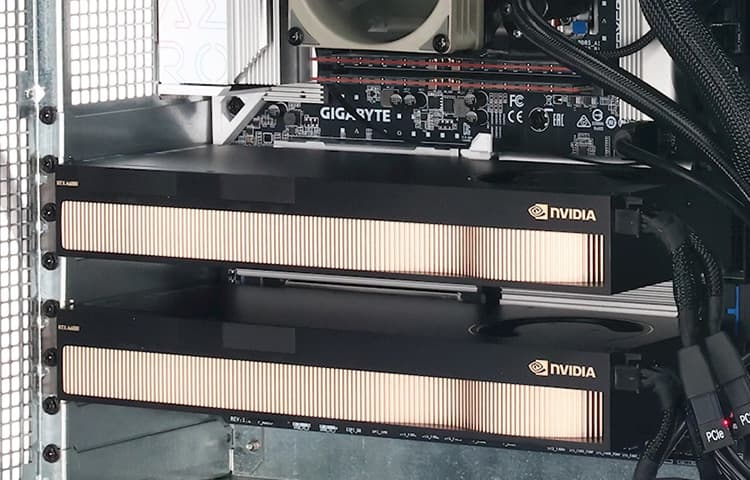
Top Picks: NVIDIA RTX 4090 | NVIDIA A6000 | AMD Radeon Pro W7900
The GPU is the heart of AI acceleration. It handles the heavy lifting for deep learning, neural networks, and real-time rendering.
- Why it matters: AI frameworks like TensorFlow and PyTorch rely heavily on GPU power.
- Pro Tip: Look for GPUs with 24GB+ VRAM to handle large models and datasets efficiently.
RAM: Memory for Multitasking
Recommended: 64GB DDR5 or ECC RAM (expandable to 128GB+)
RAM is crucial for handling large datasets and running multiple applications simultaneously.
- Why it matters: Insufficient memory can bottleneck performance during training or analysis.
- Pro Tip: ECC RAM adds error correction for mission-critical tasks.
Storage: Speed Meets Capacity
Recommended Setup:
- Primary: 2TB NVMe SSD
- Secondary: 4TB Sata SSD or 8TB+ HDD
Fast storage ensures quick data access and smooth workflow, while large capacity supports extensive datasets and backups.
- Why it matters: NVMe SSDs offer superior read/write speeds for AI workloads.
- Pro Tip: Consider RAID configurations for redundancy and performance.
Cooling: Stability Under Load
Recommended: Liquid cooling or high-performance air cooling
AI tasks can push your system to its thermal limits. Efficient cooling ensures consistent performance and hardware longevity.
- Why it matters: Overheating leads to throttling and system instability.
- Pro Tip: Ensure good airflow and monitor temperatures regularly.
Power Supply: Fuel for Performance
Recommended: 1000W+ Platinum-rated PSU
A reliable power supply is essential for supporting high-end components and future upgrades.
- Why it matters: Underpowered systems can crash under load.
- Pro Tip: Modular PSUs improve cable management and airflow.
Monitor & Peripherals: Precision Tools
Recommended: 4K IPS or OLED monitor with high color accuracy
For data visualization, debugging, and design work, a high-resolution monitor enhances clarity and productivity.
- Why it matters: Better visuals lead to better decisions.
- Pro Tip: Consider a multi-monitor setup for improved workflow.
Expandability & Connectivity
- PCIe Slots: For future GPU or accelerator upgrades
- Thunderbolt/USB-C: For fast external storage and device connections
- Networking: 10GbE or Wi-Fi 6E for high-speed data transfer
Conclusion: Future-Proof Your Workflow
Building a custom workstation is more than just assembling powerful parts - it's about creating a balanced, scalable system that supports your current needs and grows with your ambitions. Whether you're working in AI, engineering, or quality control, investing in the right specs today ensures you're ready for tomorrow's challenges.
Need help designing your next workstation? Reach out to our team for personalized recommendations based on your workflow and goals.


Why different Computers matter