


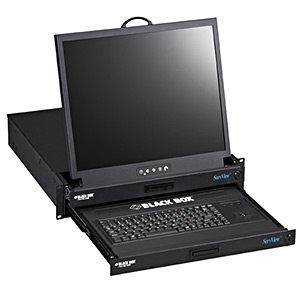
ServView Rackmount KVM Drawer, 19" LCD, Trackball Mouse, PS/2 / USB
- SKU: 10241000
- Manufacturer: Black Box
- MPN: KVT219A-R2
- Availability: TEMPORARILY OUT OF STOCK

This KVT219A-R2 2U-high KVM drawer has two sets of sliding rails — one for the keyboard/mouse and one for the LCD — so you can keep server control functions secure while viewing the monitor.
|
ServView KVM Drawer with Separate Drawer for Keyboard/Mouse and 19" LCD Features:
Overview: This 2U-high KVM drawer has two sets of sliding rails—one for the keyboard/mouse and one for the LCD—so you can keep server control functions secure while viewing the monitor. This unique KVM drawer not only gives you a space-saving solution for a crowded server room, it also features an LCD monitor that can be viewed without having to slide out the keyboard/mouse part of the drawer. It’s particularly ideal for cabinet environments where you need to frequently monitor server activity. Just pull out and flip up the LCD panel, close the cabinet door, and view server operation through the glass—all while the drawer containing the keyboard/mouse tray is stored out of the way in the cabinet itself. The ServView KVM Drawer with Separate Drawer for Keyboard/Mouse and LCD is a great choice for any cabinet- or rackmount environment where you need server monitoring but want to keep keyboard and mouse functions locked away. That’s because the keyboard/mouse tray features a front-access lock for securing it inside the drawer assembly. Like all our ServView solutions, this drawer gives you a more space-efficient replacement for a tabletop KVM station in a server room. By using the drawer, you can get rid of that bulky, antiquated CRT monitor; the full-size keyboard; and the cord-attached mouse. It does this by combining a keyboard, mouse, and monitor with a rugged, 2U-high KVM drawer. Because the keyboard has a three-button mini trackball, you don’t need a separate surface for a mousepad. Also available in a 17" version, the flat-screen, matrix TFT LCD panel provides clear video at up to 1280 x 1024 resolution. The LCD part of the drawer comprises a membrane inside an aluminum frame that shields the edge of the LCD screen, its LCD inverter, and its analog-to-digital signal converter board. A built-in on-screen display (OSD) provides you with a quickly accessible interface for adjusting display settings to your liking. Change brightness, contrast, screen resolution and refresh rates, adjust the input video sampling clock’s phase, and more. You can even choose from one of seven languages for OSD operation. The LCD screen folds into just 2U of space, and the drawer can be mounted at a comfortable working height for you. And because the monitor features a fold-forward design, it enables easy viewing when you’re typing on the keyboard or monitoring operation through a closed glass cabinet door. The ServView KVM Drawer with Separate Drawer for Keyboard/Mouse and LCD comes with mounting brackets that you can adjust from 15.4" to 25.6" (39.1 to 65 cm) front to rear for optimal placement of the drawer assembly in a 19" cabinet or 4-post rack. Outfitted with a rear metal case, the drawer assembly’s sturdy design stands up to heavy and repeated use. The drawer has two independent sliding rails, one for the LCD and one for the keyboard/mouse tray. Each part moves in and out on ball-bearing telescopic slides that ensure smooth, quiet operation. The KVM drawer has a 12-VDC, 5-amp single power adapter and, for maximum energy conservation, offers low-energy standby and suspend modes through VESA Display Power Management Signaling (DPMS). You also get a three-in-one KVM cable for drawer-to-server connections. Specifications: Backlight — (4) cold cathode fluorescent tubes What’s included:
|